Along with several other Google products, Blogger’s taken on a whole
new look: A clean, sleek interface designed for a streamlined blogging
experience. Not only does the new interface load faster, but we’ve also
added shortcuts to your most important blogging actions. Check out our
quick list of what’s changed below.
Dashboard
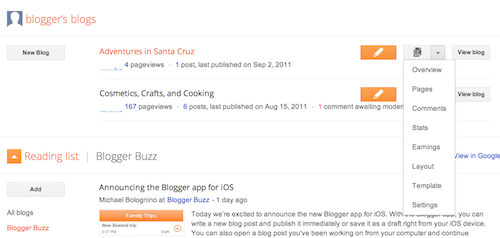
Your Dashboard, as always, is your starting point. This is where all
your blogs are listed, and you can click on the icons next to them to
perform various actions on each blog, such as:
Your Dashboard, as always, is your starting point. This is where all
your blogs are listed, and you can click on the icons next to them to
perform various actions on each blog, such as:
- Writing a new post: Just click on the orange Pencil icon on your Dashboard to access the Post Editor.
- Viewing your posts: The gray Post List icon will take you to a list of your published and drafted posts for a specific blog.
- Catching up on your favorite blogs: Below the list of your own blogs, you’ll see a list of the blogs you follow with an excerpt from their latest posts.
- Everything else: Check out the drop-down menu next to the Post List icon for a quick link to:
- Overview
- Posts
- Pages
- Comments
- Stats
- Earnings
- Layout
- Template
- Settings
Note that the Earnings tab will only show if AdSense supports your language.

Tidak ada komentar:
Posting Komentar